
Any team running Oracle Fusion Cloud Procurement across multiple environments will eventually face the same post-refresh puzzle: a user who works perfectly in Production suddenly cannot find their Smart Form in the test environment, even though the refresh was taken from Production only weeks ago.
The symptoms are very specific:
The user has all the required Job Roles, Data Access Sets, and Business Unit assignments.
The Smart Form exists in Production but is nowhere to be found in DEV or TEST.
Opening Manage Smart Forms, Manage Content Zones, Manage Agreements, or any other page under the Procurement Catalog work area shows an empty list and an empty Procurement BU dropdown.
This is not a security issue. It is not a missing role. It is not a bad refresh. The data is in the database, it just is not indexed.
The Root Cause
Oracle Fusion Cloud Procurement relies on Oracle Search Cloud Service, known as OSCS and built on Elastic Search, to power the search and listing behavior of the Responsive Self Service Procurement application and the Catalog work area. When a P2T refresh, meaning a Production to Test clone, is executed, the database tables are copied correctly but the OSCS index is not rebuilt. The index that served Production stays in Production. The target pod inherits the data without the search layer that makes it visible.
Oracle documents the OSCS ingest as a one-time setup when enabling Elastic Search for Catalog Shopping. What the documentation does not spell out clearly is that this same setup must be re-executed after every refresh.
The Fix
The resolution follows the original Oracle setup procedure for Elastic Search and requires scheduled processes launched in order from Tools, Scheduled Processes.
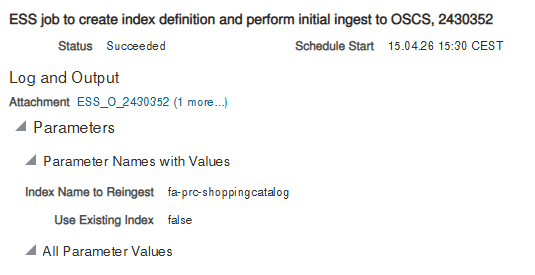
The job is ESS job to create index definition and perform Initial Ingest to OSCS, launched with the Index Name to Reingest parameter set to fa-prc-shoppingcatalog. This is the step that actually rebuilds the index for Smart Forms, Content Zones, Agreements, Public Shopping Lists, and Information Templates. Once it completes, the Procurement BU dropdown populates and the Smart Forms reappear immediately.
The same pattern applies to other OSCS-indexed modules. Depending on which features you use, you may also need to reingest:
fa-prc-suppliers: for Supplier global searchfa-prc-po: for Purchase Order searchfa-prc-pa: for Purchase Agreement searchfa-prc-pon-negotiationresponses: for Sourcing negotiation responsesfa-scm-rcv-*: for Receiving search indexes (expected PO receipts, ASN receipts, TO receipts, transactions, RMA receipts)
Required Privileges
The user launching these jobs needs the Manage Procurement Catalog Content privilege to configure Elastic Search for Catalog Shopping, and the Manage Scheduled Job Definition privilege, referenced as FND_MANAGE_SCHEDULED_JOB_DEFINITION_PRIV, to submit the ingest job itself. The second privilege is bundled in the ORA_FND_APPLICATION_ADMINISTRATOR_JOB and ORA_FND_APPLICATION_DEVELOPER_JOB roles. Without it, the OSCS job does not even appear in the submission list, which is usually the first wall teams run into.
Add these ESS jobs to your post-refresh runbook alongside banner updates, integration endpoint resets, and certificate rotation. Once the sequence becomes muscle memory, what used to be a half-day incident turns into a ten-minute fix. If you would like a review of your current refresh procedure or help designing one, reach out and we will walk through it together.